How to Connect XP-M1000x Controller to Door Accessories
| Problem (Issue) Statement: | How to connect XP-M1000x controller to door accessories |
| Description: | XP-M1000x is one of MicroEngine's legacy controller. This article will guide users on how to connect the controller to the door accessories. |
| Related Software: | NIL |
| Related Hardware: |
|
| System Application: | NIL |
| Symptom and Finding: | NIL |
| Cause: | For first time guide on how to connect XP-M1000x to the door accessories. |
| Solution: | Summary:
. Step-by-step Guide:
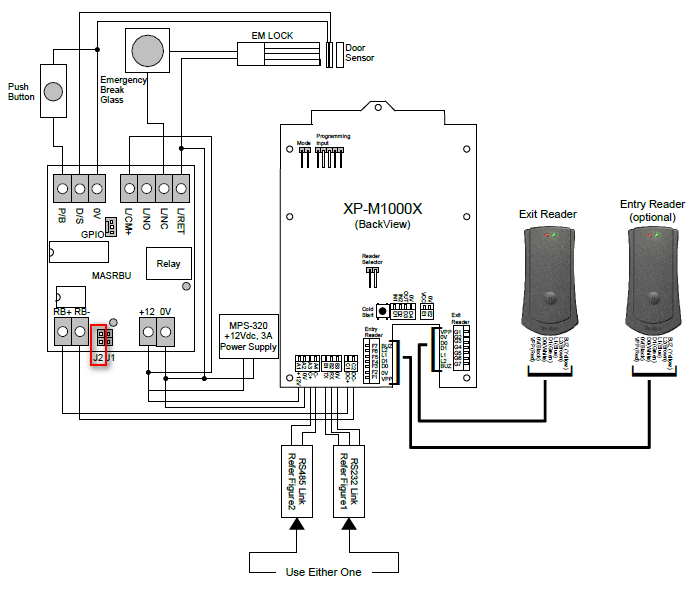
Step 1: Please refer to the following wiring diagram for the connections between the XP-M1000x controller to the door accessories: . Note Ensure that the jumper J2 is in open condition as highlighted in the figure above. |
| Common Issues: | NIL |
| Porting Date: | 27/3/2019 |
PROOF-READ
.
.
.
© MicroEngine Technology Sdn Bhd (535550-U). All rights reserved.